DialogueExtractor - The AI Dialogue Isolation Plugin
DialogueExtractor 2.0 (ARA support included) is out now! Save 40% — deal expires Aug 15, 2026.
Isolate crystal-clear dialogue. Preserve the soundstage. No compromises.
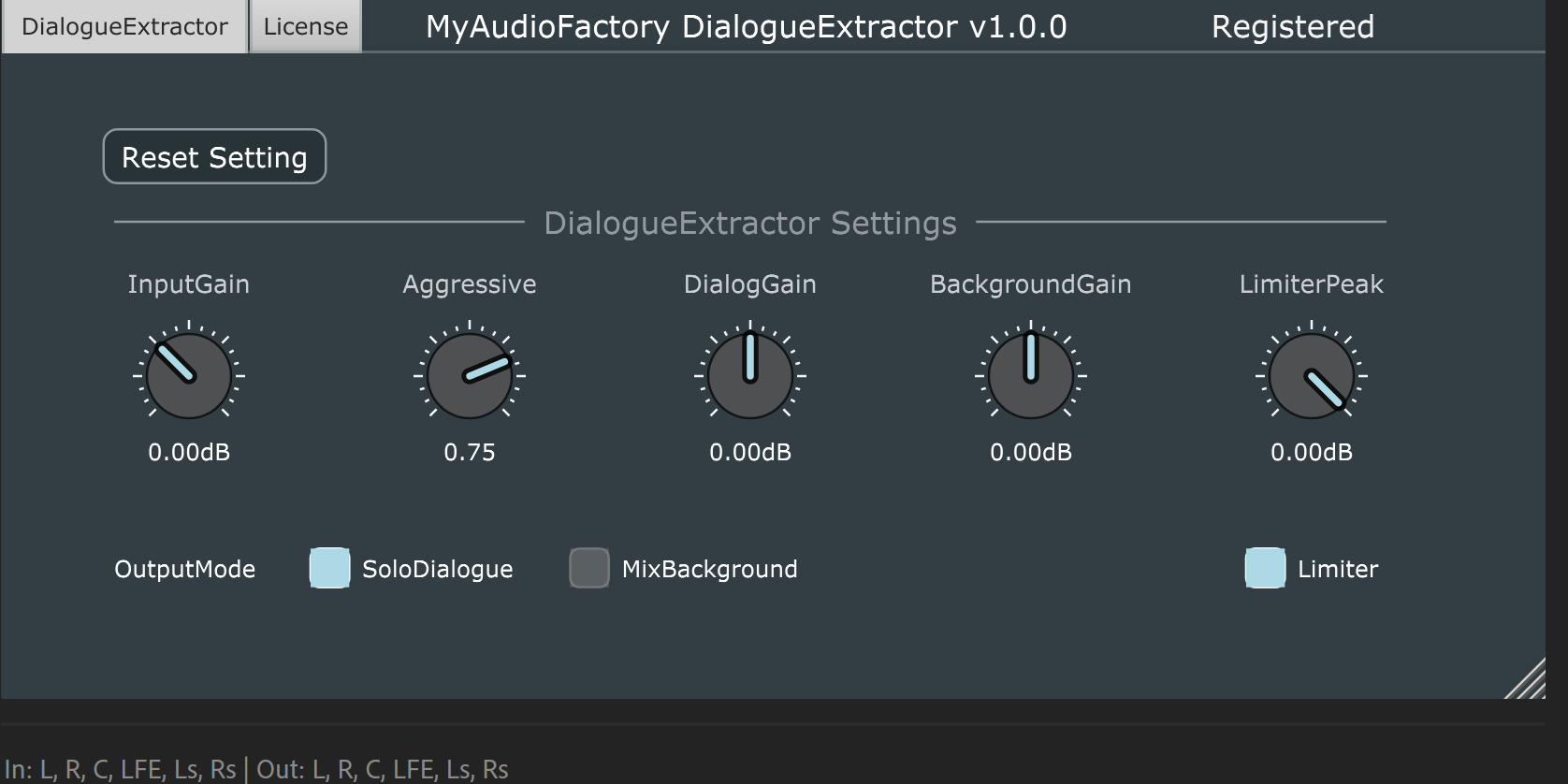
DialogueExtractor separates clean speech from any audio source while keeping spatial cues and the full mix image locked in place. No metallic artifacts. No over-suppression. Just natural, focused dialogue that sits right in the mix.
How It Works
By combining cutting-edge AI with battle-tested signal processing, DialogueExtractor sets the benchmark for separation quality. The hybrid engine handles complex audio with precision, delivering professional-grade results without the artifacts typical of pure AI solutions.
Built for Modern Workflows
Native multichannel support means you can rebalance dialogue against backgrounds across any channel configuration—stereo, surround, or immersive—without collapsing the soundstage.Adjust levels, not compromises.
Use Cases
- • Clean up noisy location audio
- • Tighten post-production dialogue tracks
- • Clarify multi-speaker and overlapping speech
- • Optimize voice content for broadcast or streaming
Immersive-Ready
Whether you're working in stereo, 5.1, 7.1, Atmos, or any immersive format, DialogueExtractor is the fastest path to intelligible, mix-ready speech.
DialogueExtractor Single License
USD $99.00USD $59.99
For a quick impression of what DialogueExtractor can do, please listen to our audio samples:
5.1ch movie audio (original)
DialogueExtractor extracted 5.1ch dialogue audio
Sport audio (original 2.0ch)
DialogueExtractor extracted sport dialogue audio
DialogueExtractor Online License
USD $99.00USD $59.99
DialogueExtractor Offline License File
USD $99.00USD $59.99
Reviewer, please contact us to obtain your free NFR license.
More DialogueExtractor processed samples can be found on Samples
Download and take a Free Trial
A single license is designated for use on one computer. It can be shared among multiple users on the same machine. It requires an internet connection only once to activate it. If your PC is broken, please contact us to receive a free new activation code to transfer your license.
An online license is designated for one user. It can be transferred to different PCs (up to 5 PCs), including transfers between Windows and macOS. To transfer your online license to a different PC, click 'Deactivate' in the license window to release the license from your current PC. You can then activate it on your target PC.
A License File is for using the plugin on a PC without internet. To get it, click "Request" in the license window, save the request file, and send it to us. We'll send you a License File. Click "LicenseFile" to select it, then "Apply" to activate the plugin.
All licenses are eligible for a free upgrade to the latest version.
For Single License and Online License, once your payment is completed, we will promptly send the activation code to the email address you provided or your PayPal email address. Typically, you should receive the code within a few minutes. Please also check your spam or trash email folders, as the message may have been inadvertently filtered as spam. If you do not receive the code within half an hour, please do not hesitate to contact us for assistance.
For Offline License File, once your payment is completed, please send the request file to us, and we will send you the License File.
To complete the registration, start DialogueExtractor. Copy your activation code to the text field located in the license window, and then click "Confirm". If you would like to take advantage of a free trial, start DialogueExtractor and click the "FreeTrial" button in the license window.
If you prefer a different license or have any feedback regarding this plugin, please do not hesitate to contact us.
For users who do not have a PayPal account, we also support WeChat Pay. Please contact us for details, as WeChat Pay is not yet integrated into our website.
Download DialogueExtractor
Support for VST VST3 and AAX format on Windows (64bits)
Support for VST VST3 AU and AAX formats on MacOS (Intel and Apple Silicon, macOS >=10.15)
Compatibility tested with FL Studio 20; Cubase Pro 13; Ableton Live 12; Logic Pro X 10.5.1; Pro Tools Ultimate 2024.6; REAPER v7.25; Audition 2023; Audacity 3.7.7
For ARA, Compatibility tested with REAPER v7.25 ,Stduio One 7, Cubase 15.
Latest Version v2.0.0
DialogueExtractor Audio Samples
Listen to the difference DialogueExtractor makes on various audio sources:
- gravity_5.1.2.wav- 5.1.2 movie audio (original)
- gravity_5.1.2_extracted_dialog.wav- DialogueExtractor extracted 5.1.2 dialogue audio
- gravity_5.1ch.wav- 5.1ch movie audio (original)
- gravity_5.1ch_extracted_dialog.wav- DialogueExtractor extracted 5.1 dialogue audio
- nfc_game.wav- 2.0ch sport audio (original)
- nfc_game_extracted_dialog.wav- DialogueExtractor extracted 2.0ch sport dialogue audio